Food Microbe Tracker Help
Instructions
for Searching by DNA Sequence
CONTENTS
Search Food Microbe Tracker by DNA Sequence
INTRODUCTION
One unique function
of the Food Microbe Tracker database
is the ability to search the entire database for specific DNA sequences. Users of this database should possess a
reasonable proficiency in performing and interpreting sequencing data.
Searching Food Microbe Tracker by DNA
Sequence
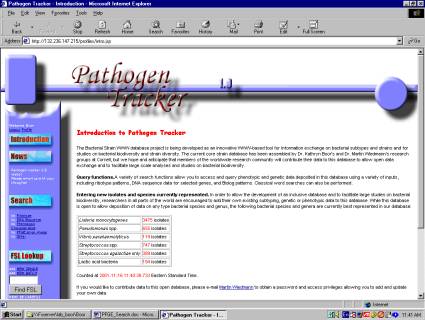
1) From the main menu, click on “Search by DNA Sequence”
(Figure 1).
Figure
1: Main menu - "Search by DNA
Sequence"

2)
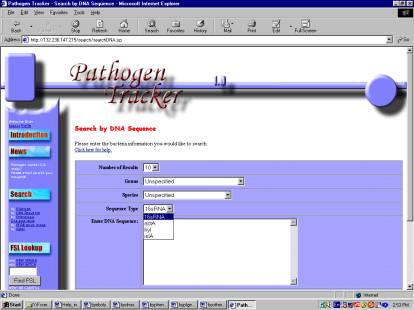
You will be given
options to choose the number of results (more will take longer), genus,
species, sequence type, and DNA sequence (Figure 2).
Figure
2: Searching Food Microbe Tracker by DNA
Sequence
3)
To enter the sequence
data in the dialog box, just cut from any text file and paste into the box
. An example text file can be
downloaded by clicking here.
4)
Once all appropriate
information is entered, click submit.
The results will be displayed.
For the example sequence, search against 16sRNA.
5)
Isolates within the
search results window are hyper-text linked to the all visible records within
the database (demographics, PFGE type name, other genotypic and phenotypic
characteristics) and links to BLAST format output are given.